



All-In-One Multi-Warehouse Inventory Management System Excel | Stock Tracker | Locations, SKUs, Purchase Orders, Dashboard
$18.74 $24.99
📝 DESCRIPTION
________________________________________
🏭✨ THE ULTIMATE WAREHOUSE INVENTORY MANAGEMENT SYSTEM ✨🏭
Take complete control of your warehouse operations with this professional-grade, all-in-one inventory management system built in Microsoft Excel and fully compatible with Google Sheets. Whether you manage one warehouse or five, this powerhouse template handles everything from receiving stock to shipping it out, all in a single beautifully designed workbook.
This is not a basic spreadsheet. This is a complete warehouse operating platform trusted by small businesses, distributors, fulfillment centers, and operations managers who need real results without expensive software subscriptions.
________________________________________
📦 WHAT YOU WILL RECEIVE - INSTANT ZIP FILE DOWNLOAD
Upon purchase, you will instantly download a ZIP file containing two complete files:
✅ The Full Excel Workbook - Warehouse_IMS_Final.xlsx - fully unlocked, ready to use, and loaded with 1,199 working formulas across 34 professionally designed sheets
📄 A Comprehensive Instructional Guide - a fully designed, colorful Word document (.docx) with step-by-step instructions covering every single feature of the template, from the very first setup all the way through daily operations, advanced reporting, best practices, and troubleshooting. The guide includes a visual table of contents, color-coded sections for each module, numbered step boxes, tip callouts, and complete column-by-column reference tables for all 34 sheets so you never have to guess what goes where.
________________________________________
🔑 KEY FEATURES AT A GLANCE
🏭 Multi-Warehouse Support - Manage up to 5 warehouses simultaneously from one central workbook. Each warehouse has its own zones, aisles, racks, shelves, and bins.
📍 25 Storage Locations - Fully mapped location codes such as WH01-ZA-A01-R01-S01-B01 for precise bin-level tracking across all your sites.
📦 25 SKU Item Master - Complete product catalog with reorder points, standard costs, lead times, lot tracking, expiry tracking, and serial number support. Easily expandable to any number of SKUs.
🔄 100 Sample Transactions - Pre-loaded with real-world stock movements including receipts, sales issues, transfers, returns, adjustments, and write-offs so you can see the system working from day one.
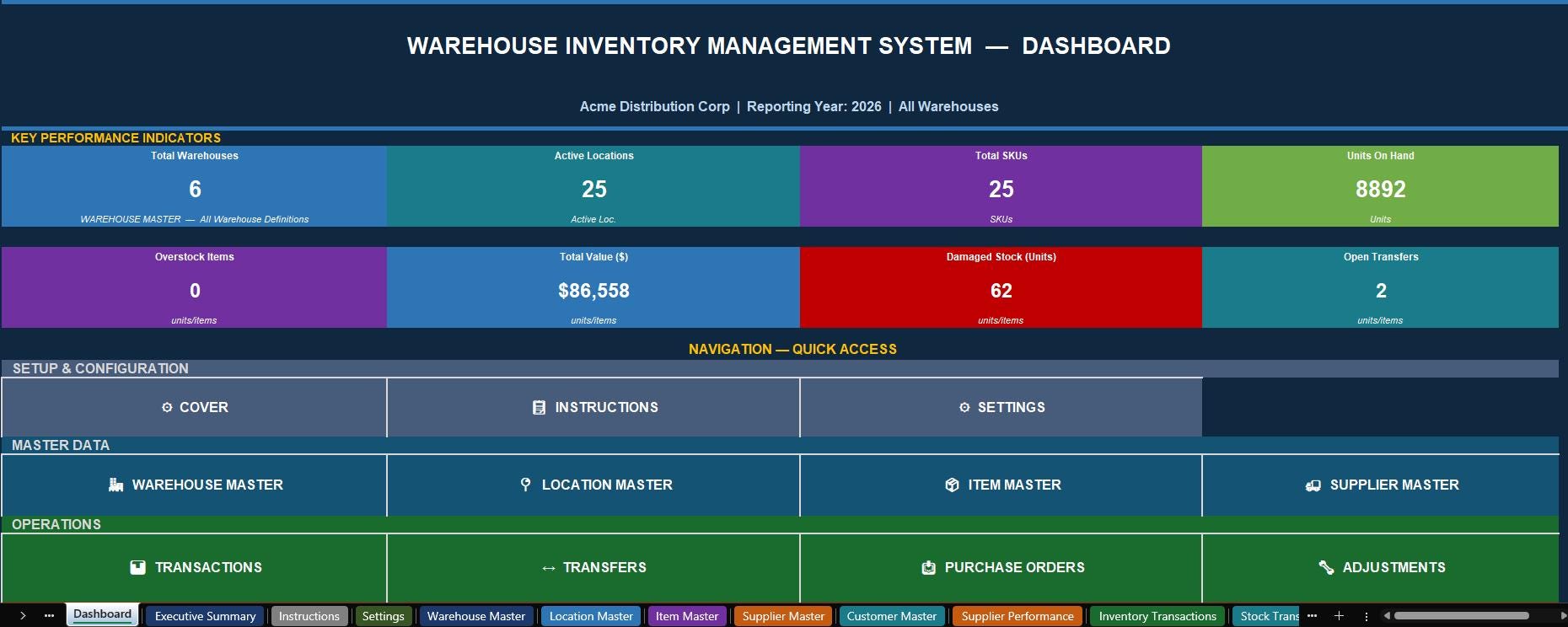
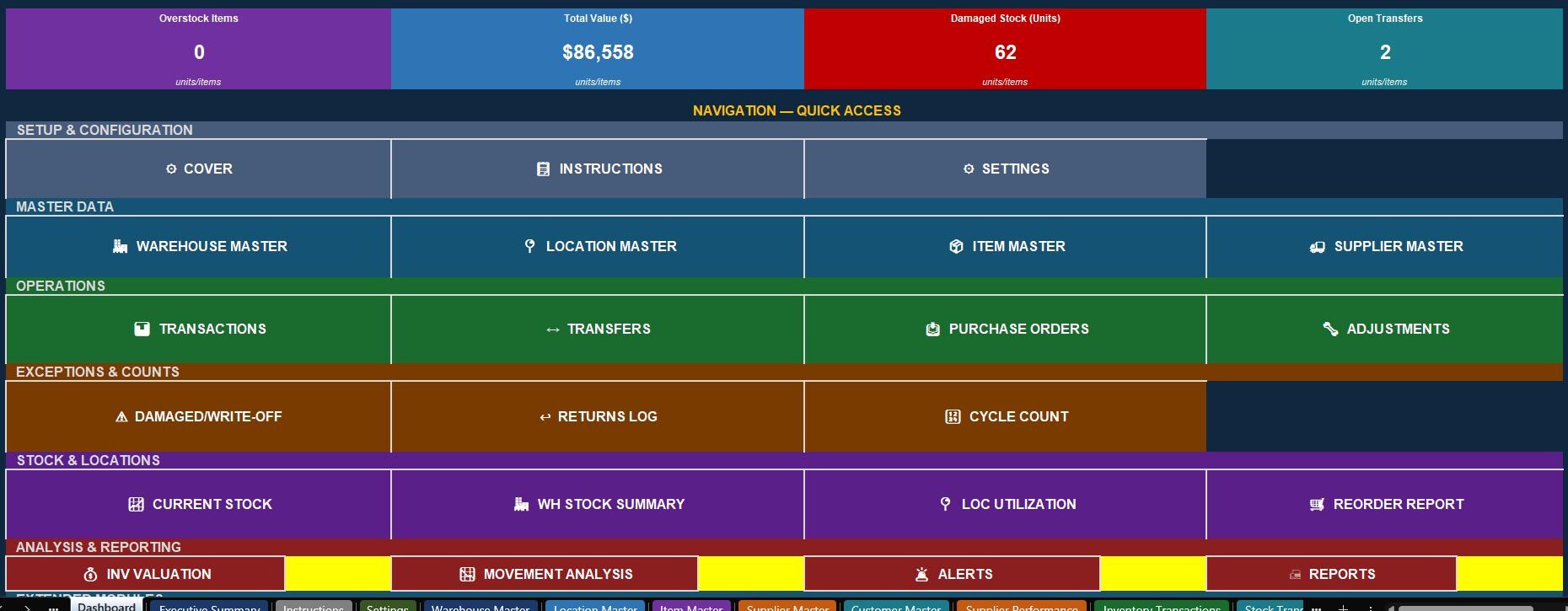
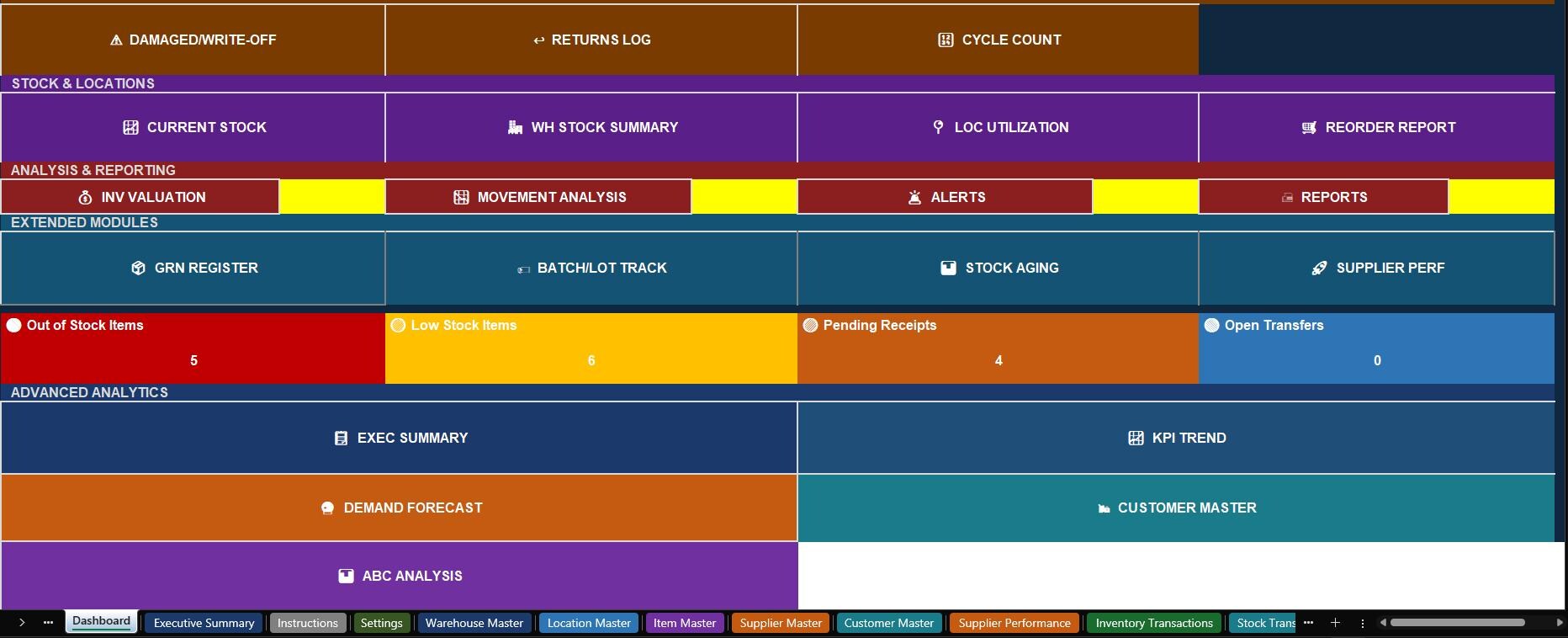
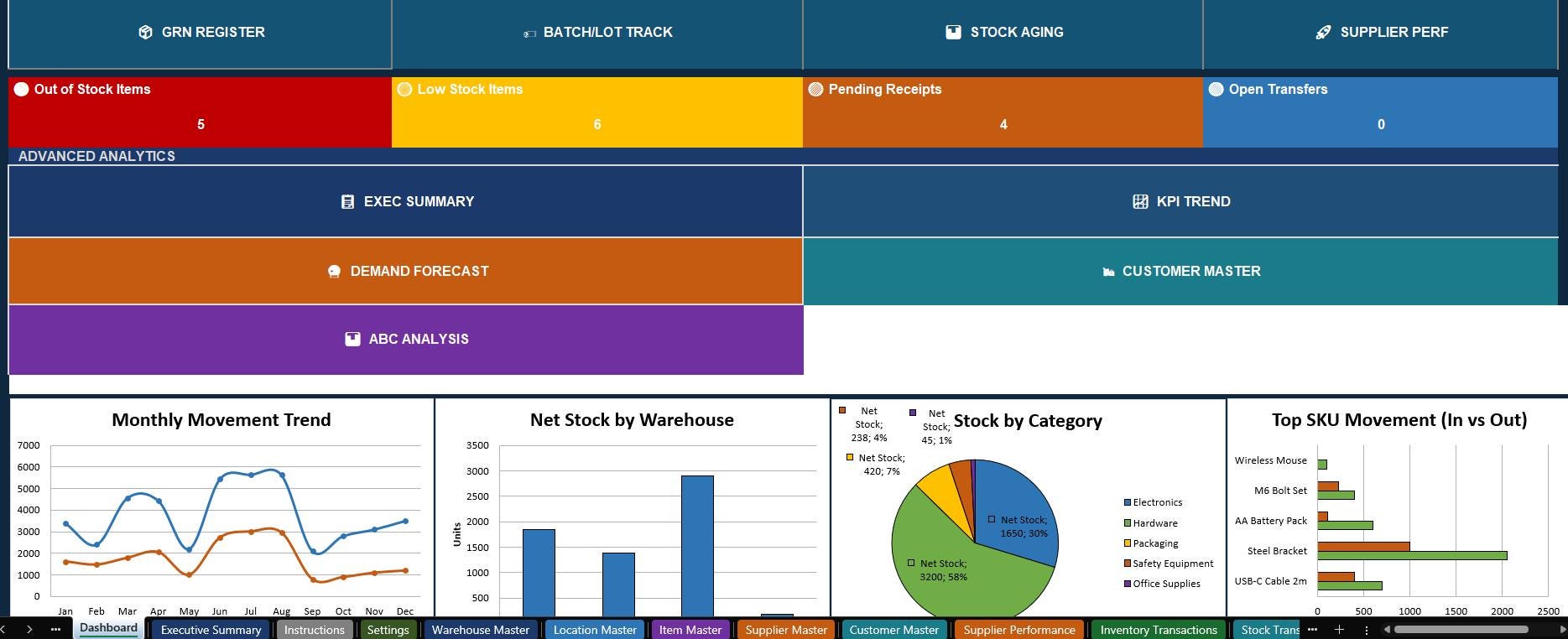
📊 Live Dashboard - A stunning command-center Dashboard with 31 clickable navigation buttons, live KPI cards showing total inventory value, warehouse counts, SKU totals, low-stock alerts, and out-of-stock warnings, all updating automatically.
📈 1,199 Verified Formulas - Every single formula has been audited and tested. Zero errors, zero circular references, zero broken links.
🔗 63 Working Hyperlinks - Every navigation button and back-to-dashboard link works perfectly in both Excel and Google Sheets.
________________________________________
📋 ALL 34 SHEETS INCLUDED
🗂️ Setup and Configuration
• Cover Page (personalized with your business info)
• Dashboard (command center with 31 navigation buttons)
• Executive Summary (management overview with live KPI cards)
• Instructions (full built-in user reference)
• Settings (master control for year, dropdowns, and business details)
📚 Master Data
• Warehouse Master (5 warehouses pre-loaded)
• Location Master (25 storage locations with utilization formulas)
• Item Master (25 SKUs with automatic duplicate detection)
• Supplier Master (6 suppliers with full contact details)
• Customer Master (15 customer accounts with credit terms)
• Supplier Performance (KPI scorecard and monthly spend tracker)
⚙️ Operations
• Inventory Transactions (100 movements, 13 transaction types)
• Stock Transfer Log (inter-warehouse and inter-location transfers)
• GRN Register (Goods Receipt Notes with QC pass/fail tracking)
• Purchase Orders (with auto-calculated pending quantities)
• Stock Adjustments (corrections and reconciliation records)
• Damaged and Write-Off Log
• Returns Log (customer and supplier returns)
• Cycle Count / Physical Count Sheet
• Batch and Lot Tracking (with expiry date monitoring)
📊 Reporting and Analysis
• Current Stock Summary (real-time, fully formula-driven)
• Warehouse Stock Summary (per-warehouse totals)
• Location Utilization (capacity vs. current stock with over-capacity flags)
• Reorder Report (auto-generated restocking alerts with urgency flags)
• Inventory Valuation (value by SKU, category, and warehouse)
• Movement Analysis (top movers, dead stock, monthly trends)
• Stock Aging (0 to 30, 31 to 60, 61 to 90, 91 to 180, 181+ day buckets)
• ABC Analysis (A/B/C plus X/Y/Z classification with action recommendations)
• KPI Monthly Trend (11 KPIs tracked month by month with YTD totals)
• Demand Forecast (30/60/90-day replenishment planning)
• Alerts and Exceptions (live exception dashboard)
• Printable Reports (print-ready layouts for seven standard reports)
🌐 Compatibility
• Google Sheets Import Guide (complete step-by-step compatibility notes)
________________________________________
⭐ STANDOUT FEATURES THAT SET THIS APART
🌟 Dynamic Reporting Year - Change just ONE cell in Settings and the year updates across all eight reporting sheets automatically. Perfect for year-end rollover with zero manual work.
🌟 ABC/XYZ Classification - Every SKU is automatically classified by value (A, B, C) and demand stability (X, Y, Z) with action recommendations, so you know exactly where to focus your inventory effort.
🌟 Demand Forecasting - 30, 60, and 90-day replenishment needs calculated automatically from average daily demand and lead times, with color-coded urgency flags (🔴 Order Now, 🟠 Order Soon, 🟡 Monitor, 🟢 Adequate).
🌟 Expiry and Batch Tracking - Full traceability register with batch/lot numbers, expiry date monitoring, and automatic 90-day expiry alerts highlighted in yellow.
🌟 Executive Summary Dashboard - Dark-themed, KPI-card-driven overview sheet perfect for management reporting, with live warehouse snapshot and six alert counters.
🌟 GRN Quality Control - Every inbound delivery is logged with QC pass/fail, inspector name, and short/over-received quantities tracked automatically.
🌟 Conditional Formatting Throughout - Low stock turns yellow, out of stock turns red, over-capacity locations are flagged, large count variances are highlighted, all automatically.
________________________________________
🎨 DESIGN AND USABILITY
🎯 Professional color palette with navy, teal, orange, and green themes throughout
🎯 Arial font, clean alignment, and consistent spacing on every sheet
🎯 Frozen header rows and auto-filters on all 20+ data tables
🎯 Dropdown menus on every field that needs them with 15 dropdown source lists in Settings
🎯 Alternating row shading for easy reading across wide data tables
🎯 Section labels and color-coded tabs for instant navigation
🎯 Print-ready layouts for seven standard reports including physical count worksheets
________________________________________
💻 COMPATIBLE SOFTWARE AND DEVICES
✅ Microsoft Excel - Windows and Mac (Excel 2016, 2019, 2021, and Microsoft 365, all versions)
✅ Google Sheets - Import via File, then Import, and use immediately in your browser. A dedicated Google Sheets compatibility guide is included inside the workbook.
✅ Mac and PC - Fully compatible with both operating systems
✅ iPad and iPhone - Use with the Microsoft Excel app or Google Sheets app on iOS
✅ Android Tablets and Phones - Compatible with Excel Mobile and Google Sheets on Android
📌 To Import into Google Sheets: Open Google Drive, click New, then File Upload, select the .xlsx file, right-click, and choose Open With Google Sheets. All formulas, dropdowns, and conditional formatting transfer automatically. The built-in GSheets Guide sheet walks you through every compatibility note step by step.
📌 To Edit and Customize the Template: Open the file in Excel or Google Sheets, go to the Settings sheet, enter your business name, address, and reporting year, then start adding your own warehouses, SKUs, and transactions. The included Word document User Guide covers every single step in detail with color-coded instructions, numbered steps, and column-by-column reference tables for all 34 sheets.
________________________________________
📦 WHAT IS INSIDE YOUR ZIP FILE
🗂️ Warehouse_IMS_Final.xlsx - The complete 34-sheet workbook with all formulas, dashboards, reports, sample data, and navigation buttons
📄 Warehouse_IMS_User_Guide.docx - A comprehensive, professionally designed Word document covering: opening and enabling the file, configuring the Settings sheet, setting up all five master data sheets, recording every type of transaction, running reports, using the dashboard, performing cycle counts, managing batch tracking and expiry dates, running demand forecasts, interpreting ABC analysis, maintaining KPI trends, and all best practices and troubleshooting tips
________________________________________
🙌 WHO IS THIS FOR?
✔️ Small and medium-sized businesses managing physical stock
✔️ Warehouse managers and operations supervisors
✔️ Inventory coordinators and stock controllers
✔️ E-commerce sellers with storage facilities
✔️ Distributors and wholesalers
✔️ Manufacturers tracking raw materials and finished goods
✔️ Anyone who needs a professional inventory system WITHOUT paying monthly software subscription fees
________________________________________
💡 FREQUENTLY ASKED QUESTIONS
Can I add more warehouses? Yes - the Warehouse Master supports unlimited warehouses. Simply add new rows.
Can I add more SKUs? Absolutely - the Item Master and all SUMIFS formulas work for any number of rows.
Does it work on a Mac? Yes - fully compatible with Excel for Mac and accessible via Google Sheets.
Is this a subscription? No. This is a one-time purchase. You own it forever.
Can I remove the sample data? Yes - the included User Guide explains exactly which cells contain formulas (do not delete these) and which contain sample data (safe to clear).
What is in the User Guide document? It is a complete step-by-step instructional manual covering all 34 sheets, every column in every data entry sheet, the full purchase order and GRN workflow, how to run cycle counts, how to use demand forecasting, troubleshooting common issues, a daily/weekly/monthly/annual maintenance checklist, and a quick reference card.
________________________________________
⭐⭐⭐⭐⭐ "Exactly what I needed - saved me from buying expensive warehouse software. Everything works perfectly."
⭐⭐⭐⭐⭐ "The included user guide made setup so easy. Was tracking inventory the same day I downloaded it."
⭐⭐⭐⭐⭐ "The ABC analysis and demand forecast alone are worth 10x the price."
________________________________________
📬 Questions before purchasing? Send me a message - I respond quickly and am happy to help!