
Advanced Subcontractor Database System | Excel & Google Sheets Template | Contractor Tracker | Insurance Compliance | Project Management
$11.24 $14.99
📝 DESCRIPTION
________________________________________
🏗️✨ THE ULTIMATE SUBCONTRACTOR DATABASE SYSTEM - STOP CHASING SPREADSHEETS. START RUNNING YOUR BUSINESS.
Are you managing subcontractors through scattered notes, outdated Excel files, and endless email threads? It's time to upgrade. This Advanced Subcontractor Database System is a fully built, professionally designed spreadsheet workbook that puts your entire subcontractor operation - contacts, compliance, rates, documents, performance reviews, and more - into one powerful, organized platform.
Whether you're a general contractor, construction company, project manager, facilities director, or service-based business owner, this template was built for you.
________________________________________
📦 WHAT YOU'LL RECEIVE
When you purchase, you'll instantly download a ZIP file containing 2 files:
✅ 1 × Excel Workbook (.xlsx) - The fully built Advanced Subcontractor Database System, compatible with Microsoft Excel AND Google Sheets
✅ 1 × Instructional User Guide (.docx) - A beautifully designed, full-color step-by-step guide walking you through every sheet, every function, and every setting from first setup to daily use
Simply unzip, open the Excel file, follow the guide, and you're operational within minutes.
________________________________________
🗂️ 18 FULLY BUILT SHEETS INSIDE ONE WORKBOOK
This isn't a blank template. Everything is pre-built, pre-formatted, and ready to use with sample data already loaded so you can see exactly how it works before entering your own records.
📋 1. Cover Sheet - Premium dark-navy branded cover page with one-click navigation into the workbook
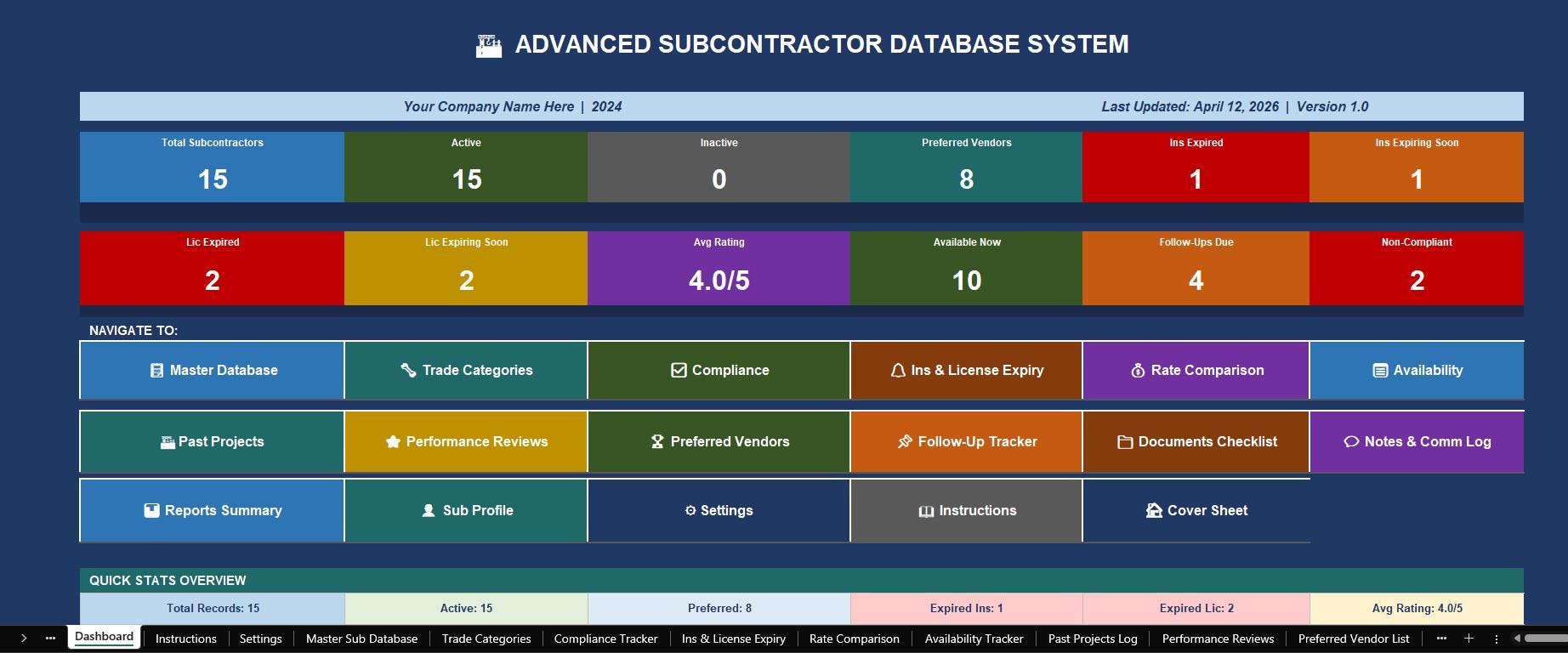
📊 2. Executive Dashboard - Live KPI cards showing total subcontractors, active vendors, expired insurance, expiring licenses, average ratings, follow-ups due, and more - all updating in real time
📖 3. Instructions Sheet - Built-in user guide right inside the workbook so your whole team can get up to speed fast
⚙️ 4. Settings & Control Panel - The brain of the entire workbook. Enter your company name, year, alert thresholds, and dropdown lists ONCE and every sheet updates automatically
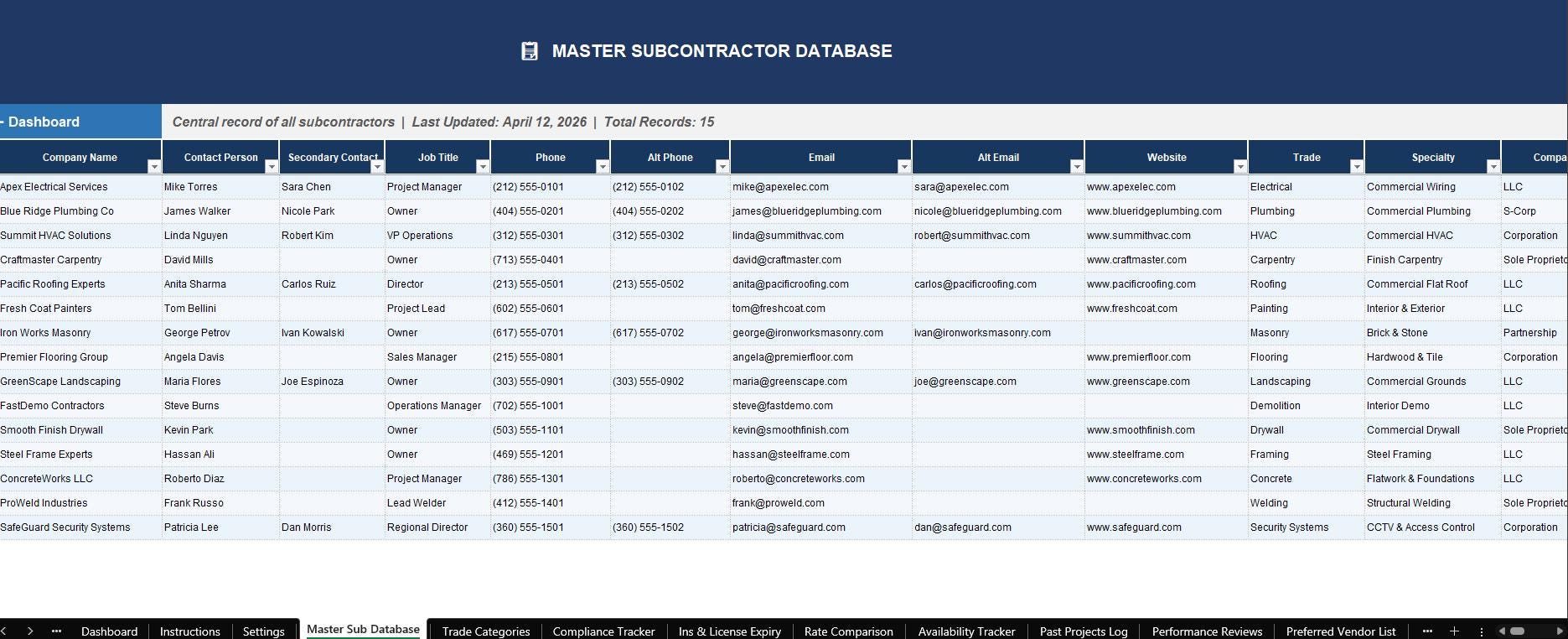
📋 5. Master Subcontractor Database - The central hub with 52 columns covering every detail: contact info, trade, license, insurance, rates, availability, compliance status, risk level, and project history
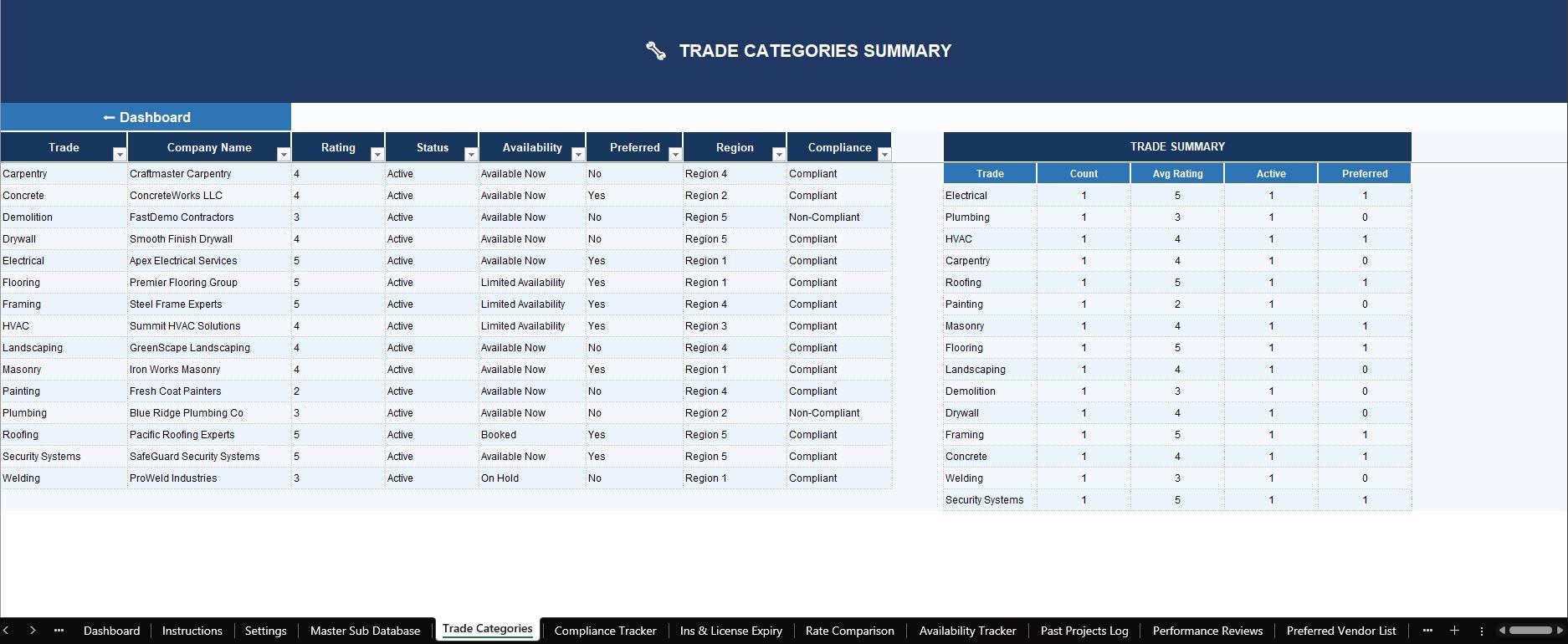
🔧 6. Trade Categories Sheet - Subcontractors organized and summarized by trade with count, average rating, and preferred vendor breakdown
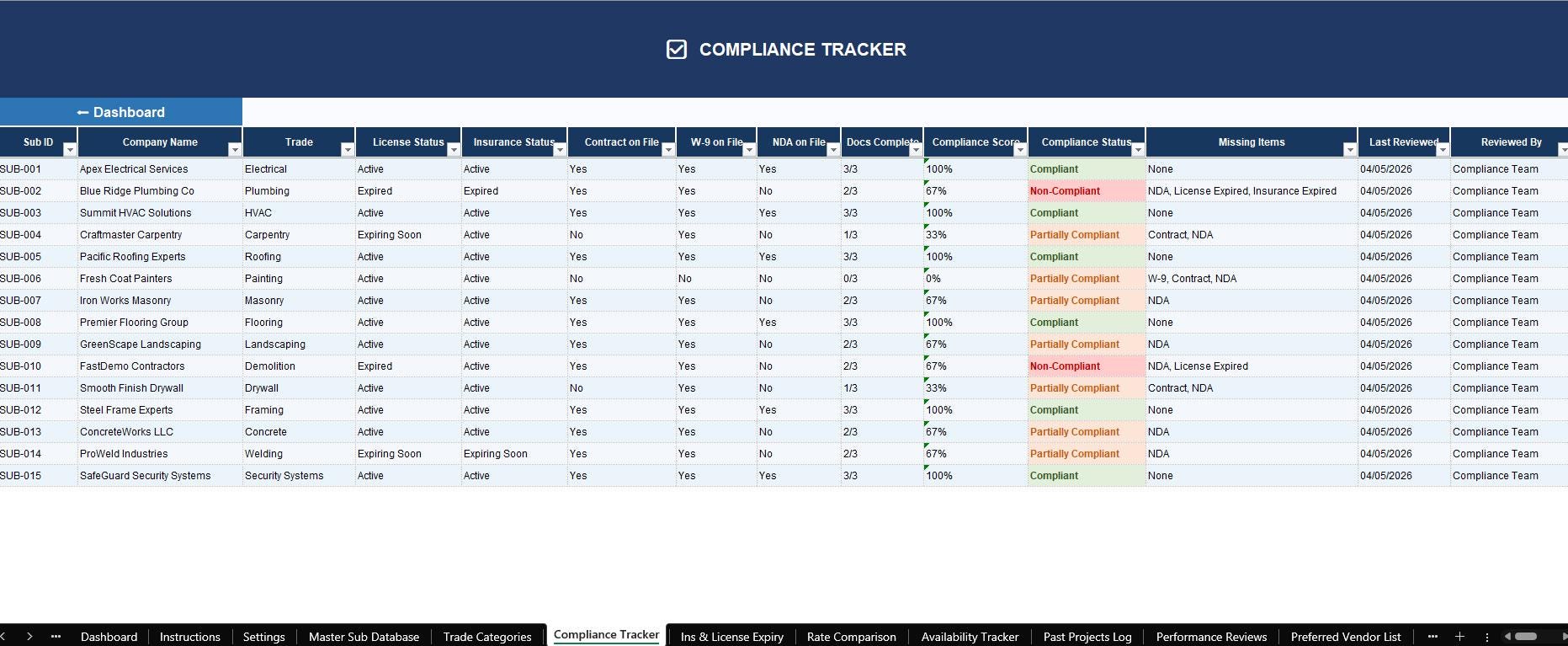
✅ 7. Compliance Tracker - Real-time green / orange / red compliance status for every vendor based on live date calculations
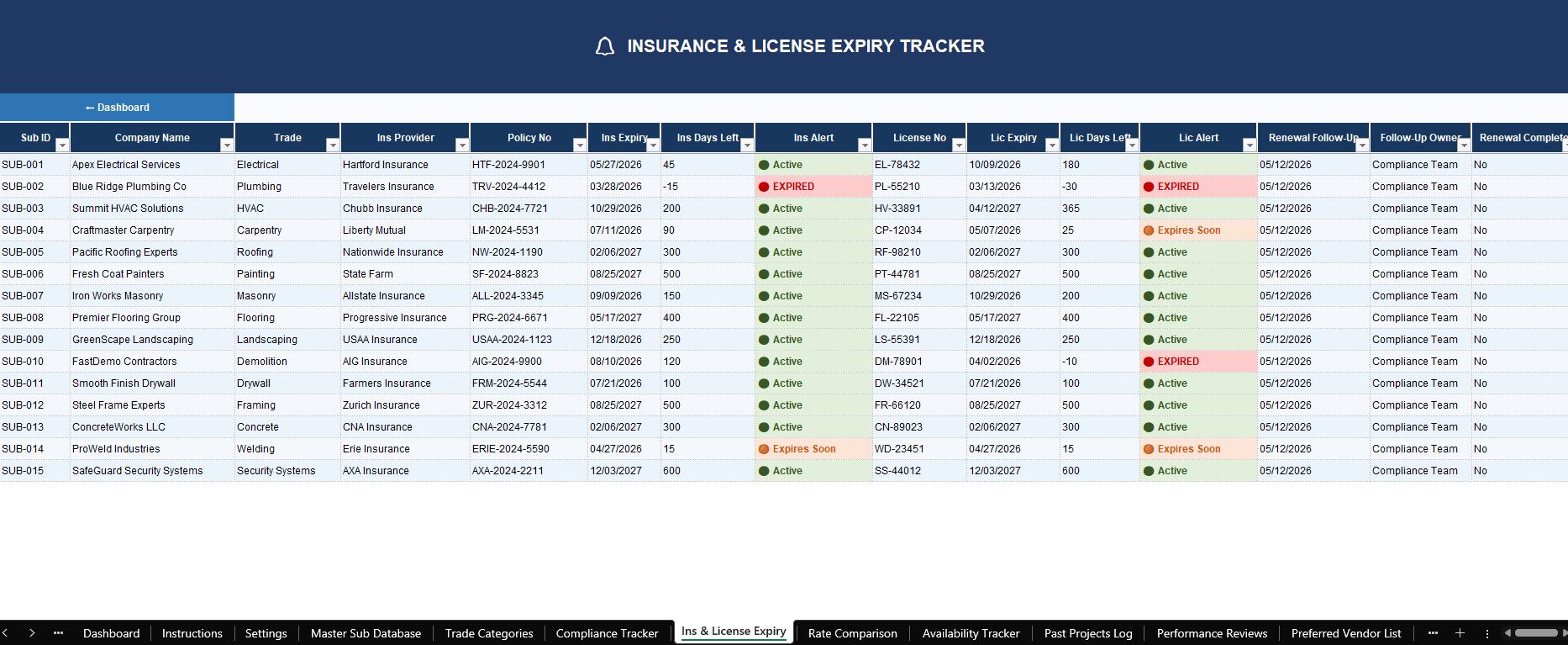
🔔 8. Insurance & License Expiry Tracker - Live countdown of days remaining with 🔴 EXPIRED, 🟠 Expires Soon, and 🟢 Active indicators that update every single day automatically
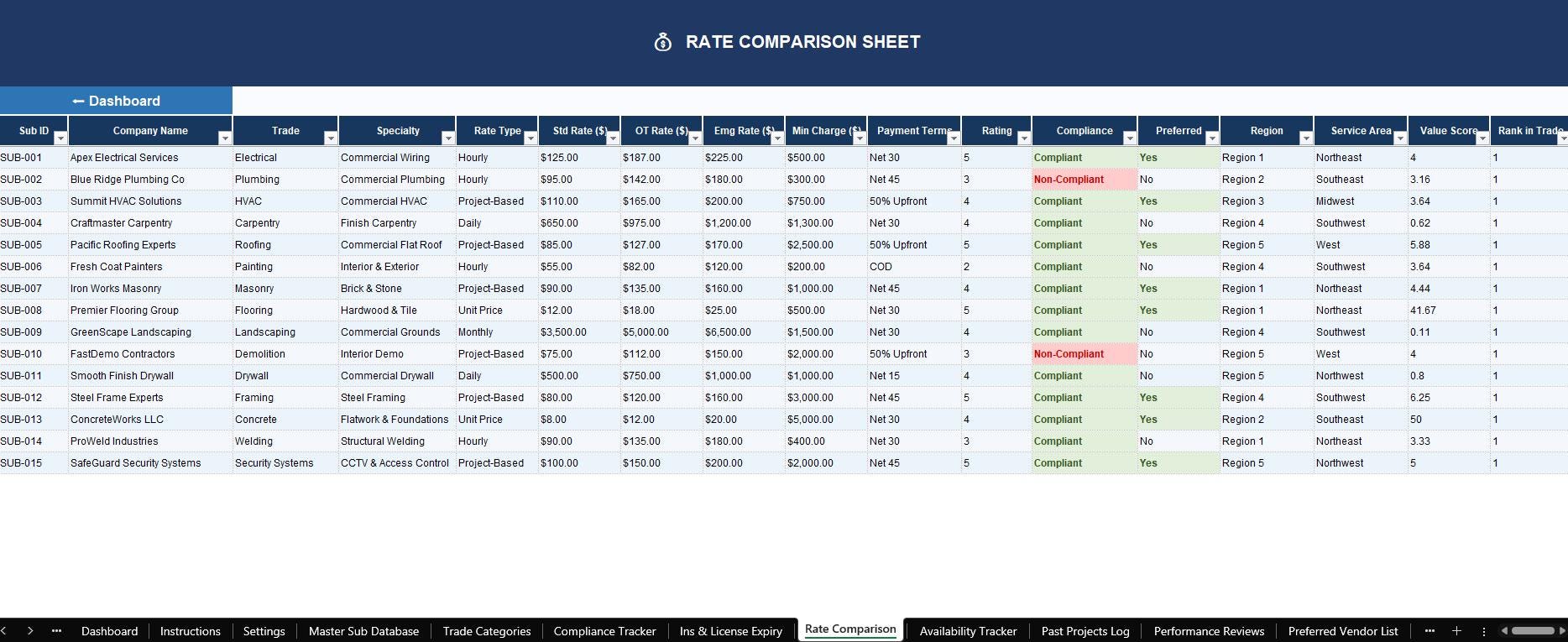
💰 9. Rate Comparison Sheet - Side-by-side pricing analysis with value scores and trade rank so you always find the best deal
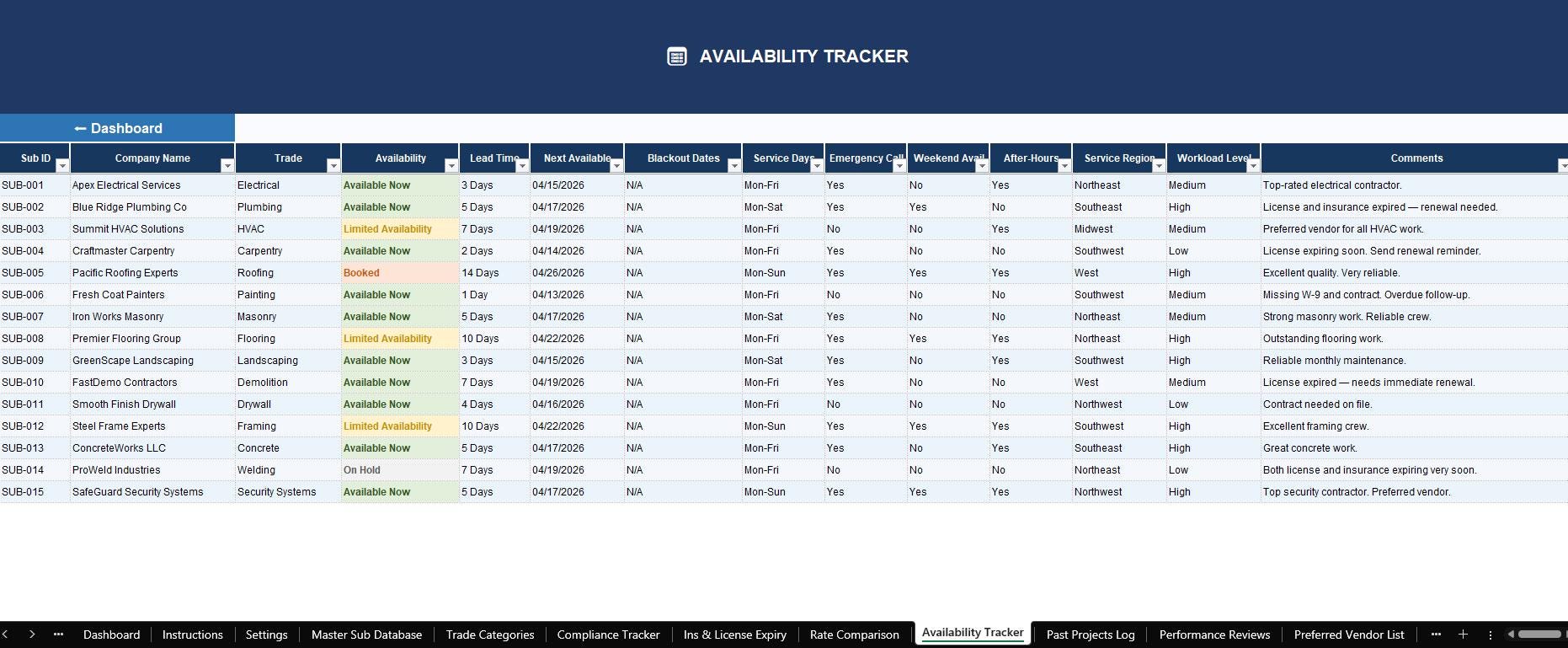
📅 10. Availability Tracker - Know exactly who is available now, who is booked, and when vendors are free before you make project assignments
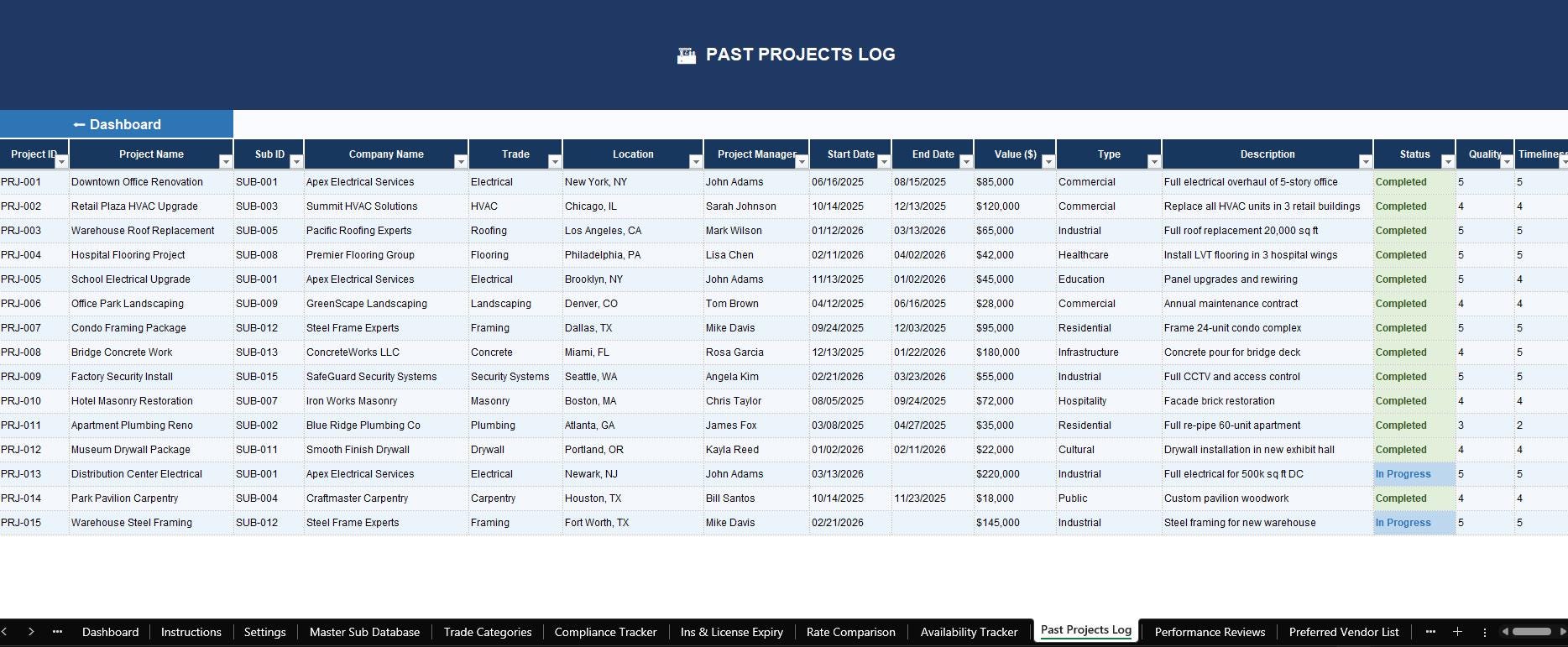
🏗️ 11. Past Projects Log - Full project history with quality, timeliness, communication, and safety ratings per project
⭐ 12. Performance Reviews - Structured evaluation scoring with weighted averages calculated automatically across 7 criteria
🏆 13. Preferred Vendor List - Your pre-qualified, top-performing roster automatically identified based on rating, compliance, and document status
📌 14. Follow-Up & Renewal Tracker - Action items, renewal deadlines, and overdue alerts with priority levels and team assignment
📁 15. Documents Checklist - Track W-9s, certificates of insurance, contracts, NDAs, licenses, and more with color-coded received / missing indicators
💬 16. Notes & Communication Log - Complete contact history for every vendor relationship
📊 17. Reports Summary - Management-ready reporting with trade breakdowns, compliance overview, and top-performer lists
👤 18. Printable Subcontractor Profile - A clean, professional one-page profile for any subcontractor - perfect for project files, lender packages, or vendor audits
________________________________________
⚡ POWERFUL FEATURES BUILT IN
🔗 34 Working Navigation Hyperlinks - Click any button on the Dashboard to jump to any sheet instantly. Every sheet has a Back to Dashboard button so you're never lost
🧮 154 Live Formulas - Compliance status, risk levels, days remaining, total projects, last project date, weighted averages, trade rankings, and value scores are all calculated automatically
🎨 Smart Conditional Formatting - Expired insurance turns red. Expiring soon turns orange. Low-rated vendors turn red. Preferred vendors highlight green. Inactive vendors gray out. You see problems before they become disasters
📋 15 Dropdown Menus - Standardized data entry across trade categories, availability status, compliance status, rate types, service areas, states, follow-up reasons, and more
🔁 Settings Drive Everything - Change your company name, year, or alert window in the Settings sheet and it instantly updates across the Cover Sheet, Dashboard, footers, and all formula calculations throughout the entire workbook
📅 Auto-Updating Dates - Insurance and license countdowns calculate from TODAY() so they are always accurate, every single day, without you touching anything
________________________________________
💻 SOFTWARE & DEVICE COMPATIBILITY
This workbook is designed to work beautifully across all major platforms:
Desktop Software: 🖥️ Microsoft Excel 2016, 2019, 2021, and Microsoft 365 (Windows & Mac) - Full functionality, all features supported 🖥️ Google Sheets (via Google Drive on any browser) - All core formulas work. Minor setup notes for dropdowns and conditional formatting are included in the guide
Mobile & Tablet: 📱 Microsoft Excel app for iPhone and iPad 📱 Microsoft Excel app for Android phones and tablets 📱 Google Sheets app for iOS and Android (view and edit on the go)
Importing & Editing: 📂 To use in Microsoft Excel: Open the .xlsx file directly - no conversion needed 📂 To use in Google Sheets: Go to Google Drive → click New → File Upload → select the .xlsx file → right-click the uploaded file → Open with → Google Sheets. All data, formulas, and formatting will import automatically 📂 To edit on mobile: Download the Microsoft Excel or Google Sheets app, upload the file to OneDrive or Google Drive, and open it from the app on your phone or tablet
________________________________________
📚 THE INCLUDED INSTRUCTIONAL GUIDE
Your ZIP download includes a professionally formatted Word document (.docx) User Guide that covers:
📌 How to set up the Settings sheet from scratch - step by step 📌 How every one of the 18 sheets works and what to enter in each field 📌 Which cells are auto-calculated (do not overwrite them) and which are manual entry 📌 How the Settings values propagate throughout the entire workbook 📌 How the compliance, alert, and risk systems work 📌 Weekly, monthly, and quarterly maintenance checklists 📌 A full troubleshooting section covering the 8 most common issues 📌 A Quick Reference Card showing every key formula cell at a glance 📌 Google Sheets compatibility notes for every feature
The guide is designed in matching colors to the workbook and reads like a professional software manual - clear, visual, and easy to follow even if you are not an Excel expert.
________________________________________
🎯 WHO IS THIS FOR?
This template is perfect for:
🏗️ General Contractors managing 5 to 500+ subcontractors 🏢 Construction Companies tracking multi-trade vendor rosters 🔧 Facilities Management teams overseeing building maintenance vendors 📐 Project Managers needing compliance visibility before project assignments 🏠 Property Management companies handling service contractors 💼 Small to Medium Businesses managing outsourced service providers 📋 Office Administrators responsible for vendor document compliance
________________________________________
⭐ WHY THIS TEMPLATE STANDS OUT
Unlike generic contact lists or basic spreadsheets sold elsewhere, this system was built as a real operational platform inside a spreadsheet. Every formula is error-checked, every link is tested, every dropdown is connected, and the Settings sheet actually controls the whole workbook. It is designed and quality-checked to the standard of a premium business software tool - just without the monthly subscription fee.
________________________________________
📥 HOW TO DOWNLOAD
1️⃣ Purchase the listing 2️⃣ Go to your Etsy account → Purchases and Reviews 3️⃣ Click Download Files 4️⃣ Save the ZIP file to your computer 5️⃣ Unzip the folder - you will find the Excel workbook and the Word guide inside 6️⃣ Open the Excel file and start with the Settings sheet 7️⃣ Follow the User Guide for step-by-step setup instructions
________________________________________
⚠️ PLEASE NOTE
🔒 This is a digital download - no physical item will be shipped 🔒 Due to the nature of digital products, all sales are final 🔒 This file is for personal and single-business use only - not for redistribution or resale 🔒 A basic familiarity with Excel or Google Sheets is helpful but not required - the guide covers everything
________________________________________
💬 QUESTIONS? Message me before purchasing and I'll be happy to help. If you love it, a review would mean the world and helps other buyers find this resource! ⭐⭐⭐⭐⭐